How to Use a Freelance Tax Calculator: Step-by-Step Guide
Freelance taxes, explained through your actual numbers.
Understand what you keep, where the taxes come from, and which advanced controls actually matter. An illustrated, step-by-step guide to the real USAFC Freelance Tax Estimator for tax years 2025 and 2026.
Open Tax Estimator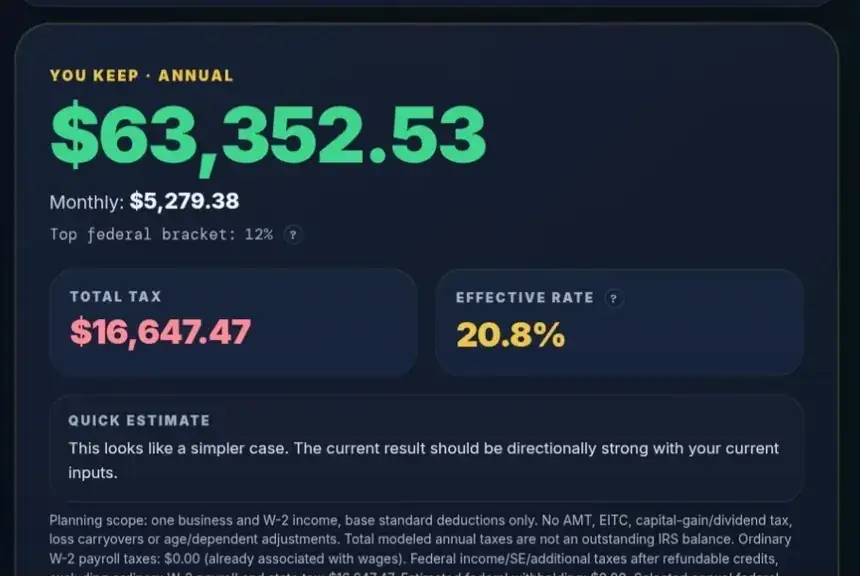
Jump to a guide section
1. Before you start: choose the tax year and gather your numbers2. Make your first estimate3. Read You Keep, taxes and deductions4. Add QBI and a state estimate5. Add a job or spouse wages6. Compare retirement contributions and available cash7. Compare standard and itemized deductions8. Explore the S-Corp planning mode9. Add children and other dependents10. Understand the investment-income boundary11. Plan a federal tax reserve12. Save, copy or export a scenario13. Continue from fees to goals14. Fix common input and interpretation mistakes15. Frequently asked questions16. Methodology, limitations and your next stepOn a phone, every calculator screenshot and diagram fits the page without sideways swiping. Wide data tables may still scroll horizontally.
Get a useful number before opening Advanced Options.
This is a synthetic teaching example, not a tax quote or individualized advice.
Open the actual calculator →01Before you start: choose the tax year and gather your numbers
Match the year to the income
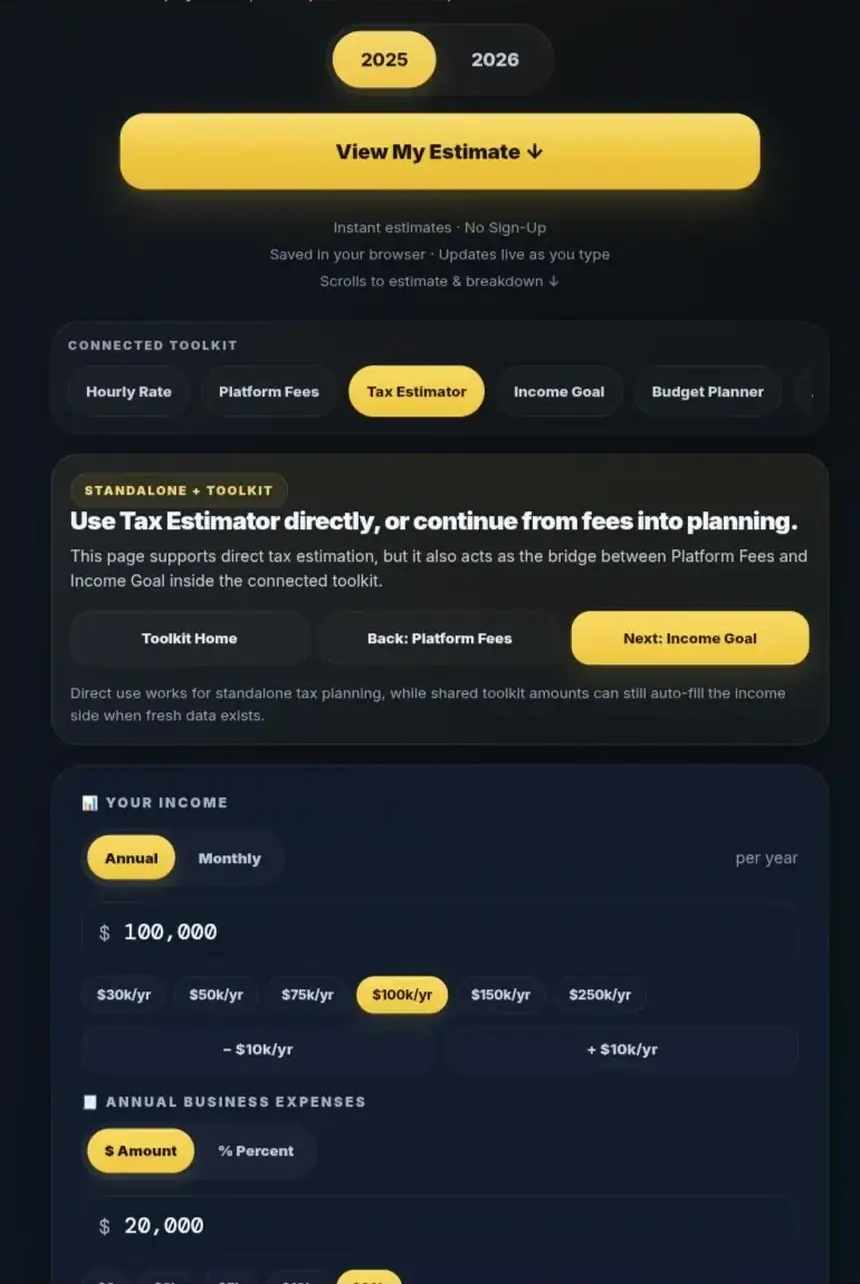
Choose 2026 for income earned during 2026, including when preparing for the 2027 filing season. Choose 2025 to revisit 2025 income. The current calculator supports these two tax years; a return filed in 2027 does not require a 2027 tax-year setting.
Year selection changes more than the heading. Federal brackets, the base standard deduction, the Social Security wage base and certain deduction limits differ. For example, the base standard deduction for Single filers is $15,750 for 2025 and $16,100 for 2026. The model does not add every age, blindness or dependent-related adjustment. [1]
Gather a full-year forecast
Have your expected business receipts and eligible annual business expenses ready. If relevant, also gather annual employment wages, expected federal income-tax withholding, eligible retirement contributions, deduction records and the prior year's tax return.
Use receipts before business expenses for a standalone estimate. If another USAFC tool transfers income after platform fees, retain that basis and avoid deducting those fees again. Keep wages separate from business receipts.
Check any restored settings before entering a new scenario. A previous state estimate, child count or retirement contribution can change the result even when the new income amount looks correct.
02Make your first estimate
Enter a simple annual case
Use this five-step setup for the running example:
- Select 2026.
- Choose Annual for the income period.
- Enter 100000 under Your Income: $100,000 of annual business revenue.
- Under Annual Business Expenses, select $ Amount and enter 20000.
- Select Single as the filing status.
For this comparison, keep Include QBI (20%) estimate enabled, leave its material-participation minimum checkbox unchecked, and keep every other optional feature off or zero. Confirm the entered amounts after leaving each field and allow the result to settle.
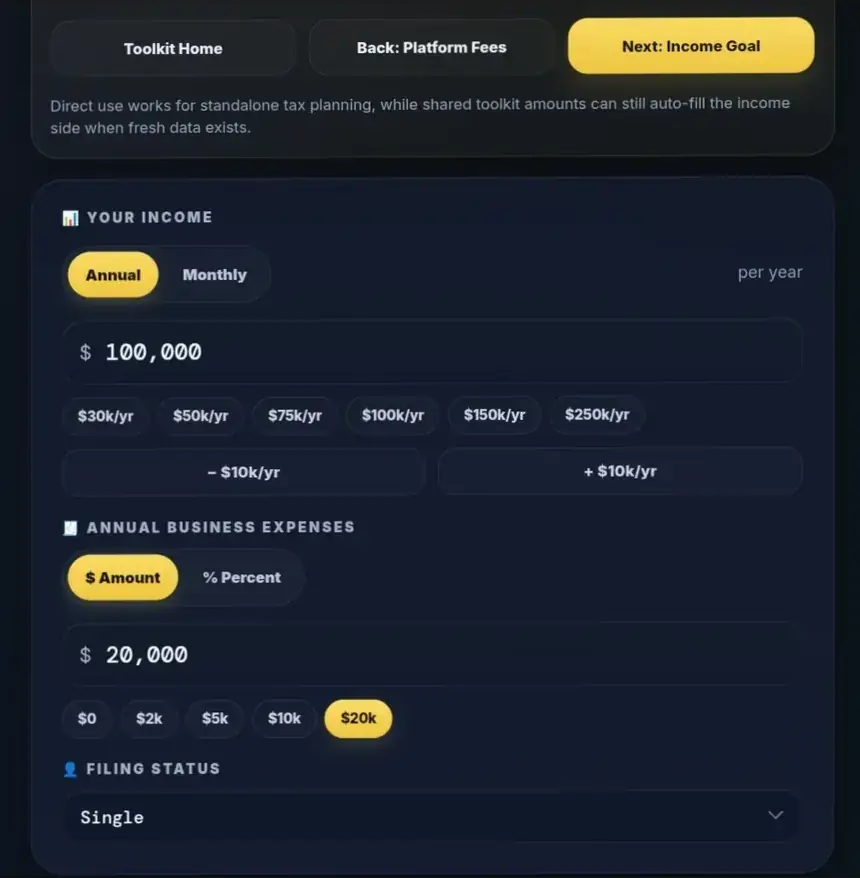
Your business profit is $80,000: $100,000 of receipts minus $20,000 of expenses. Eligible expenses reduce the profit available for taxes and personal use. The standard deduction is a later income-tax adjustment; it is not another business expense.
Use the filing status for which you qualify. The supported choices are Single, Married Filing Jointly and Head of Household. Status affects deductions and federal thresholds. The tool does not establish eligibility for Head of Household, and it does not offer Married Filing Separately or Qualifying Surviving Spouse.
Use Monthly without annualizing expenses twice
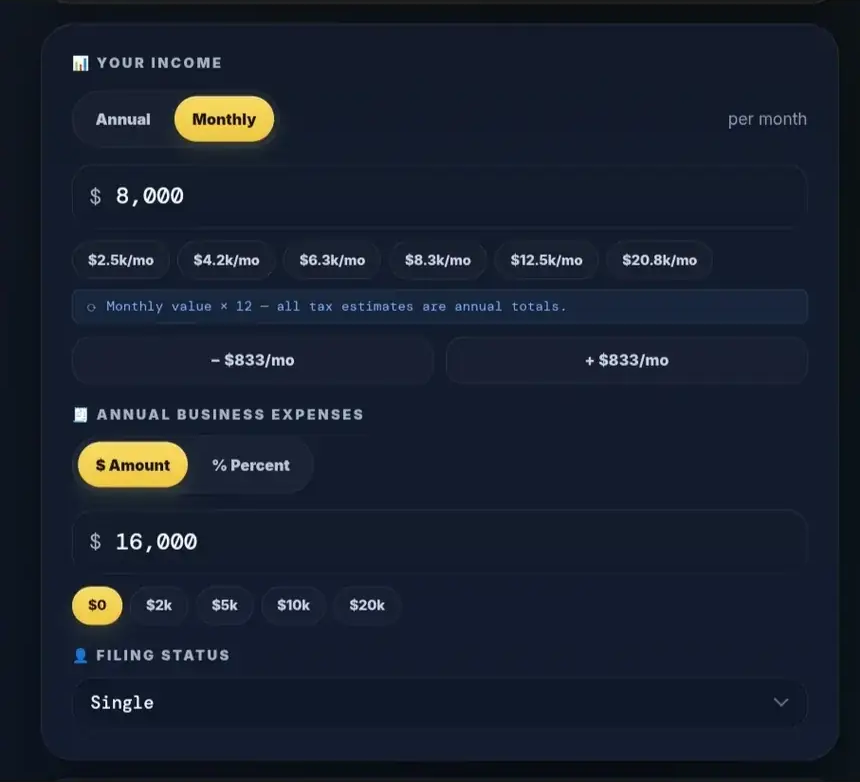
For a second case, select Monthly, replace the income with 8000, and enter 16000 in annual dollar expenses. The calculator annualizes income to $96,000. Subtracting $16,000 of annual expenses again produces $80,000 of profit, so this case has the same modeled annual taxes as the running example.
| Monthly-entry example | Amount |
|---|---|
| Monthly receipts entered | $8,000.00 |
| Annualized receipts | $96,000.00 |
| Annual dollar expenses entered | $16,000.00 |
| Annual profit | $80,000.00 |
| Modeled annual taxes | $16,647.47 |
| You Keep, monthly | $5,279.38 |
Dollar expenses remain annual in Monthly mode. Switching Annual and Monthly also changes how the existing income number is interpreted; it does not convert that number to preserve the same annual total. Select the period first, then enter or replace the amount.
Use shortcuts as assumptions you control
% Percent estimates annual expenses as a share of annualized receipts. Entering 20 means 20%; the permitted expense range is 0–100%. Dollar and percentage modes retain separate values, so check the active field after switching. An expense percentage is a planning assumption, not evidence that those costs are deductible.
Income chips and the plus/minus income controls help compare scenarios. Review the filled value and period after using them. Blank optional amounts generally act as zero, but blank or zero business receipts do not produce a useful main estimate. Expenses are capped at receipts in this model; business losses require a fuller calculation.
03Read You Keep, taxes and deductions
Follow the money through the result
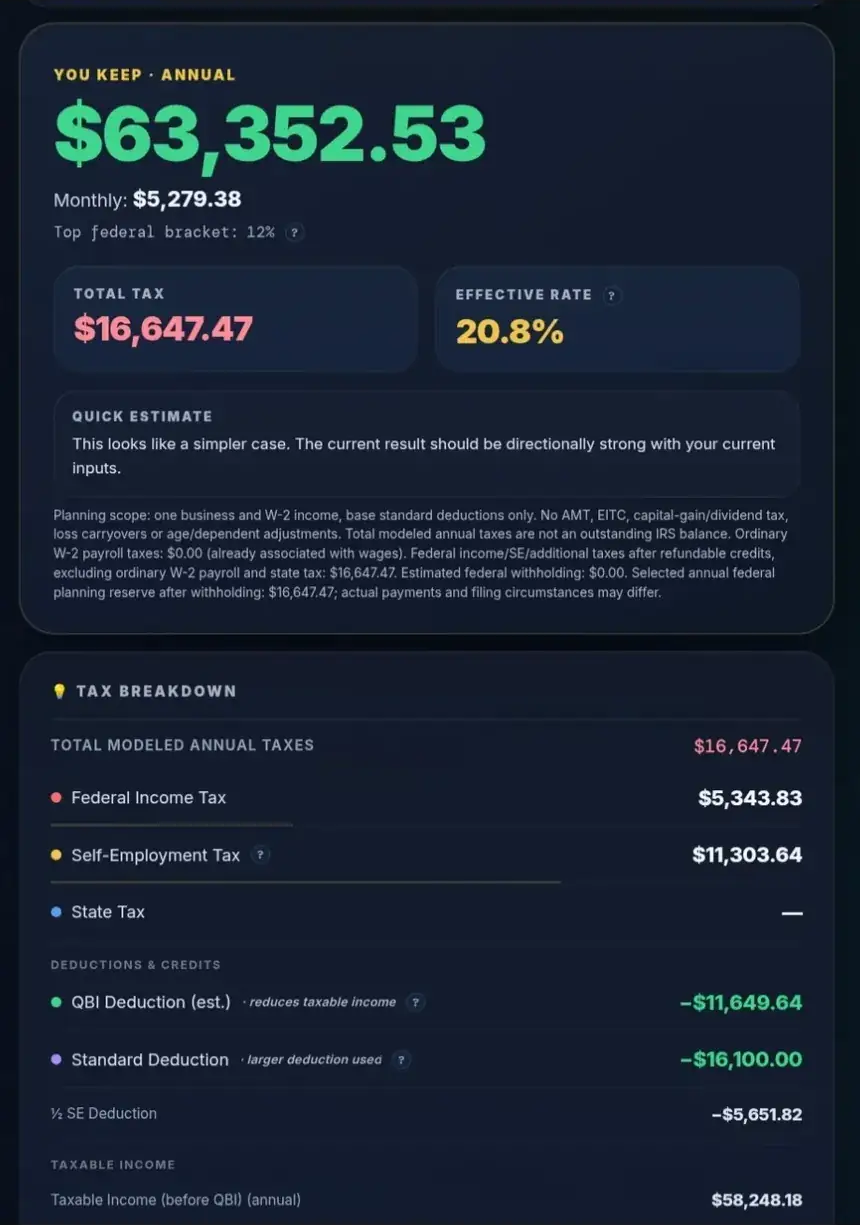
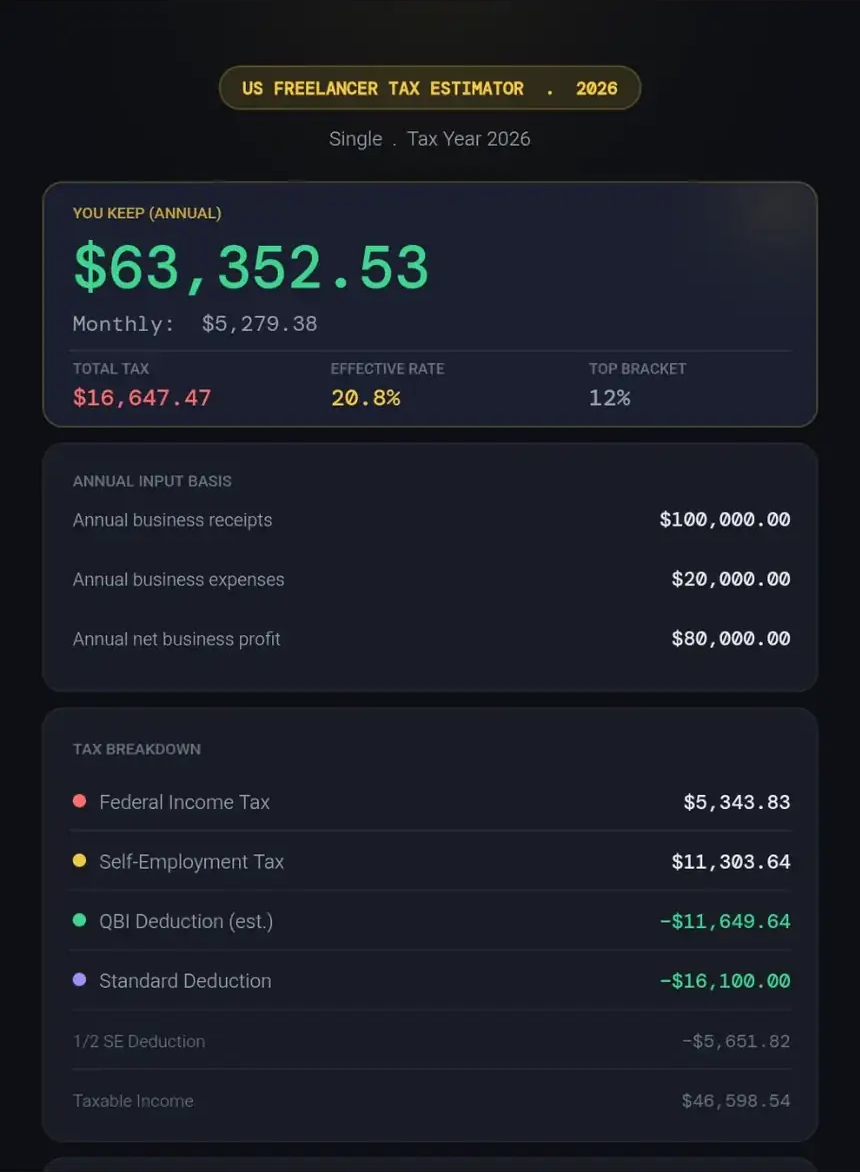
For the $100,000-revenue, $20,000-expense annual example, the recorded results are:
| E01: 2026 Single, QBI enabled | Annual amount |
|---|---|
| Business profit | $80,000.00 |
| Federal Income Tax | $5,343.83 |
| Self-Employment Tax | $11,303.64 |
| Total modeled annual taxes | $16,647.47 |
| You Keep | $63,352.53 |
Here, You Keep equals profit minus modeled taxes. Business expenses have already been removed. The result does not mean the IRS still needs $16,647.47: payments and withholding are separate from annual tax liability.
Separate federal income tax from self-employment tax
Federal income tax uses progressive brackets after applicable adjustments and deductions. Self-employment tax generally funds Social Security and Medicare and follows a different calculation. Under the ordinary method used here, $80,000 of profit becomes $73,880 of net self-employment earnings; the applicable regular components produce $11,303.64. [2, 3]
The Social Security component is subject to an annual wage base: $176,100 for 2025 and $184,500 for 2026. Medicare has different treatment, and the additional 0.9% Medicare tax can apply above combined Medicare wages and self-employment earnings of $200,000 for Single/Head of Household or $250,000 for joint filers. Employment wages can use some or all of your own Social Security wage base before freelance earnings are considered. [2, 3, 4]
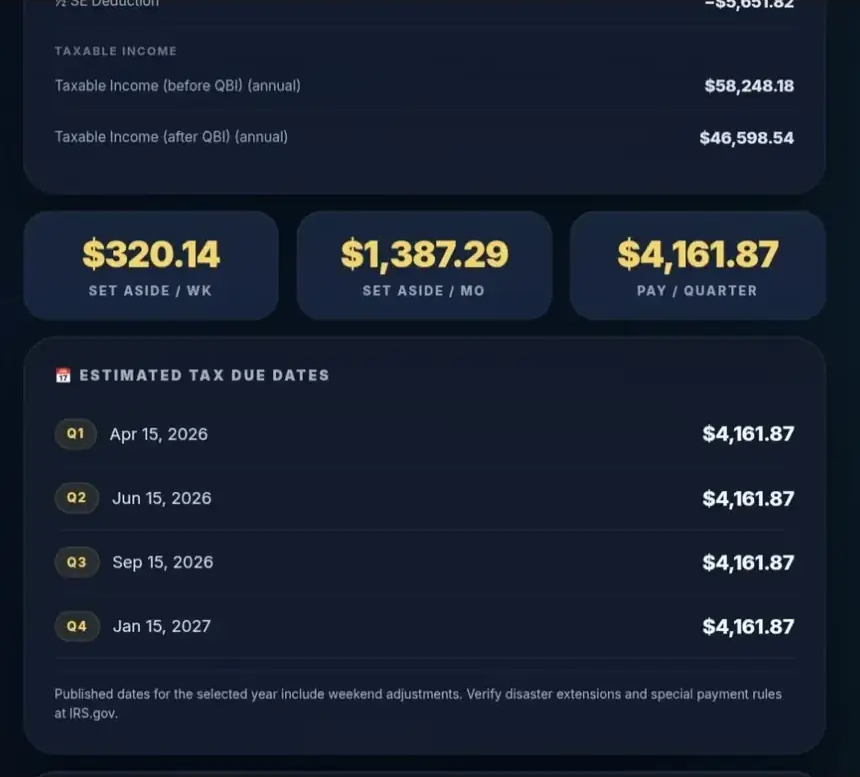
Under Deductions & Credits, follow the income-tax bridge. In E01, the deduction for half of regular self-employment tax is $5,651.82. The $16,100 standard deduction and the modeled QBI deduction then help produce federal taxable income of about $46,598.54. The half-SE deduction reduces the income-tax base; it does not return half of the self-employment tax in cash.
For the underlying mechanics, see how self-employment tax is calculated.
Read rates and scope notes carefully
Top federal bracket identifies the highest ordinary federal income-tax bracket reached. It does not apply that rate to every dollar. Effective Rate instead uses total modeled taxes divided by modeled income before personal tax: business profit plus modeled wages in a basic mixed-income case. It is not simply federal income tax divided by client receipts.
In Monthly mode, distinguish monthly take-home figures from Total modeled annual taxes. With retirement funding, the hero explicitly says before retirement. Labels such as Quick estimate, Improved estimate and Complex case are prompts about model complexity, not statistical accuracy scores or professional approval.
Try these inputs in the calculator before adding the options below.
04Add QBI and a state estimate
Compare the QBI toggle
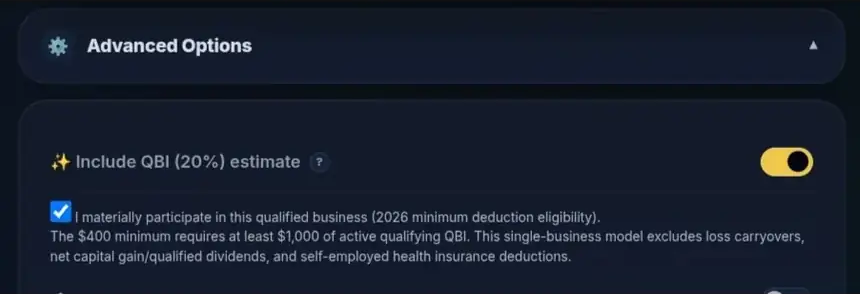
Open Advanced Options and locate Include QBI (20%) estimate. The qualified business income deduction can reduce federal taxable income for an eligible business. Its base and taxable-income ceiling mean the deduction is not always 20% of business profit. It does not reduce regular self-employment tax. [5, 6]
Keep the E01 inputs unchanged and compare the toggle:
| E01 comparison | QBI off | QBI on |
|---|---|---|
| Federal income tax | $7,526.60 | $5,343.83 |
| Self-employment tax | $11,303.64 | $11,303.64 |
| Total modeled taxes | $18,830.24 | $16,647.47 |
| You Keep | $61,169.76 | $63,352.53 |
The modeled federal income-tax reduction is $2,182.77. That is a result for this profile, not a promised saving for every freelancer.
Check the conditional 2026 minimum
For 2026, the checkbox reads I materially participate in this qualified business (2026 minimum deduction eligibility). Select it only when that statement and the applicable eligibility rules are true.
The enacted minimum is $400 when at least $1,000 of qualifying active QBI and the material-participation conditions are satisfied. The minimum is compared with the ordinary deduction; it is not added on top. It is a deduction, not a $400 credit or guaranteed refund. Gross receipts or unadjusted profit of $1,000 alone do not establish eligibility. USAFC models one business rather than the complete multi-business eligibility calculation. [1, 7]
Complete higher-income QBI fields only when relevant
QBI restrictions use taxable income before the QBI deduction, rather than client revenue. For 2026, the threshold is $201,750 for Single/Head of Household and $403,500 for joint filers, with phase-in ranges of $75,000 and $150,000 respectively. The 2025 thresholds are $197,300 and $394,600, with narrower $50,000/$100,000 ranges. [1, 5, 6, 7]
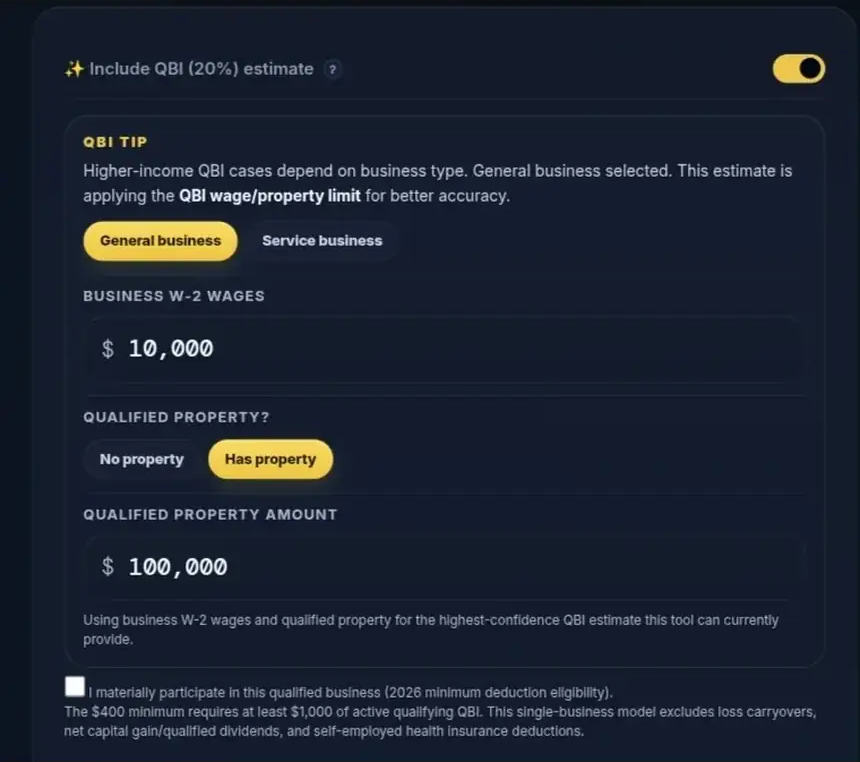
At higher income, the panel can expose General business, Service business, Business W-2 Wages and Qualified Property?. The service-business choice concerns the legal specified service trade or business classification; ordinary language such as “I provide services†is insufficient.
Business W-2 wages means eligible wages paid by the business. Your day-job salary belongs in the separate employment section. Choose Has property, then enter eligible basis in Qualified Property Amount. The amount uses the relevant unadjusted basis, not its resale value. If these fields are absent at lower income, their visibility is conditional rather than an input error. S-Corp owner wages are not automatically filled into the QBI wage field. The model applies higher-income restrictions, but it does not establish wage, property or business-type eligibility. [6]
Read QBI eligibility and the 2026 minimum deduction for the broader rules.
Add a simplified state estimate
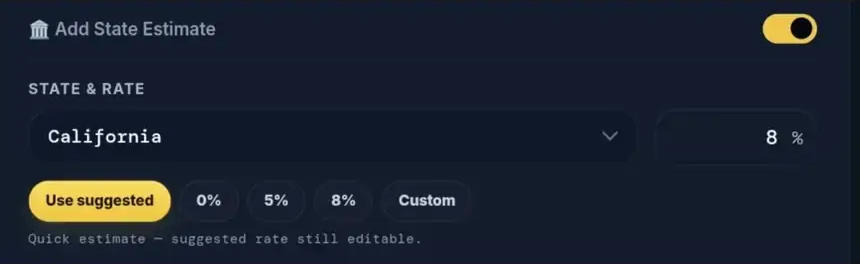
Enable Add State Estimate, choose a state under State & Rate, and read its model note. Some states use a fixed model rate, some a zero modeled income-tax amount, and others an editable quick rate. — Custom Rate — lets you use a justified planning percentage from 0–20%; fixed and zero-model rate fields are disabled.
These are simplified assumptions applied to a modeled income base. The selector is not a complete fifty-state engine, has no District of Columbia choice, and does not reproduce state deductions, credits, local taxes or every business tax. A suggested rate is not a statement of your legal marginal rate. A zero modeled amount does not establish that no state-level tax applies.
05Add a job or spouse wages
Keep employment wages separate
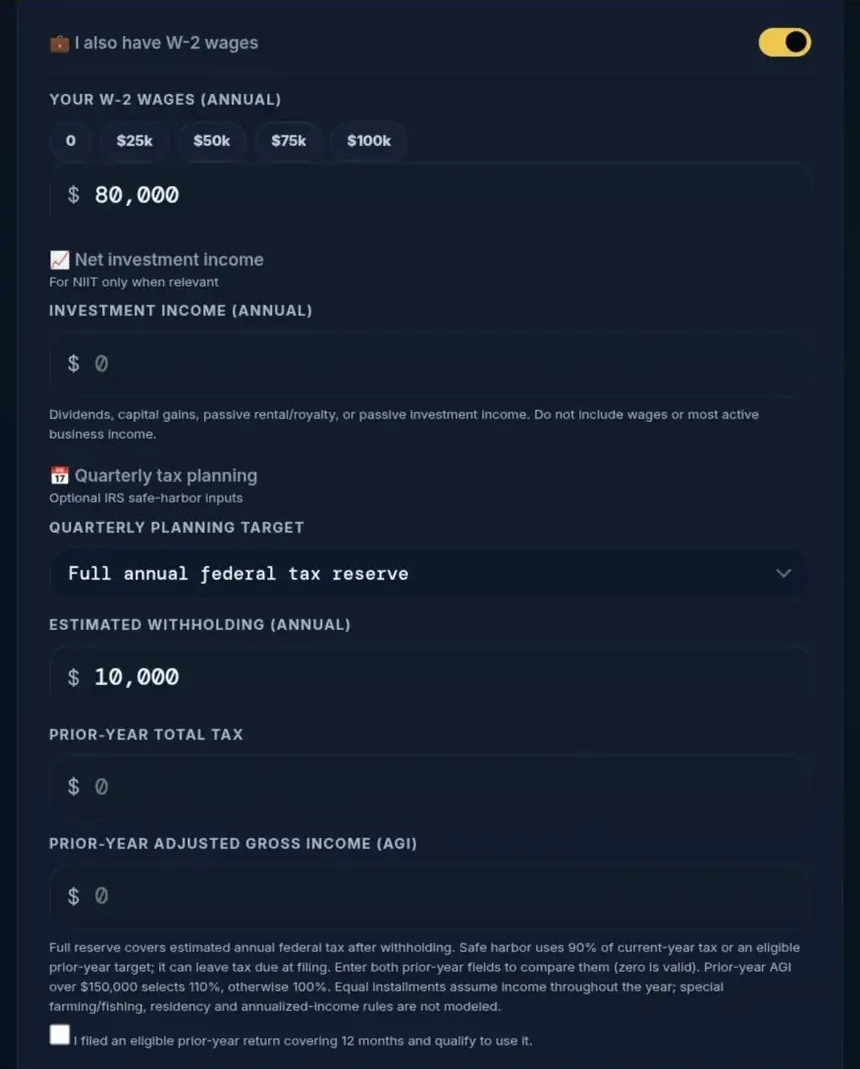
Enable I also have W-2 wages and enter annual employment wages in Your W-2 Wages (Annual). Keep freelance receipts in Your Income, with business expenses in their own field. Entering a salary in both places duplicates income.
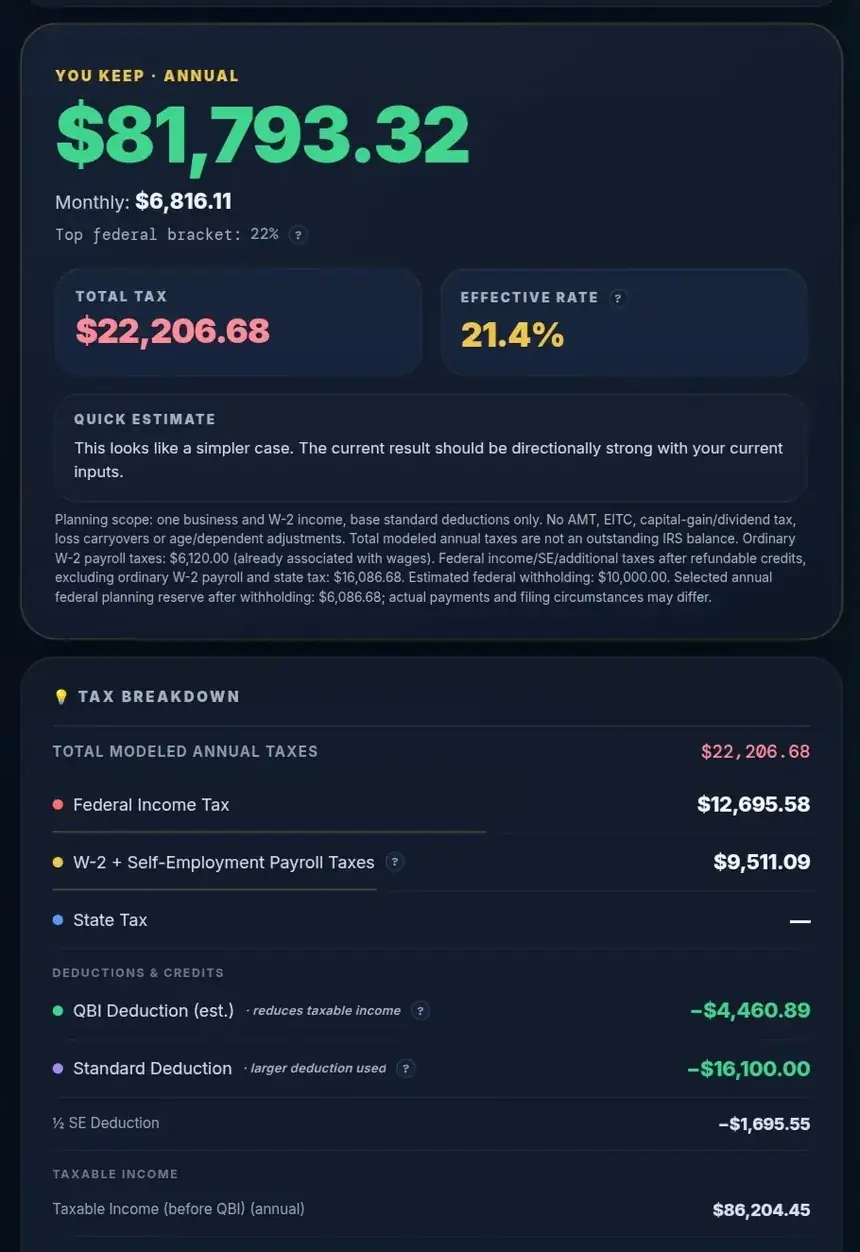
For E03, use 2026, Single, annual freelance receipts of $30,000, annual expenses of $6,000 and your W-2 wages of $80,000. Keep QBI on and other options off. Enter $10,000 of annual federal withholding in the quarterly-planning controls.
| E03: wages plus freelance business | Annual amount |
|---|---|
| W-2 wages plus business profit | $104,000.00 |
| Federal income tax | $12,695.58 |
| Self-employment tax component | $3,391.09 |
| Ordinary W-2 employee payroll component | $6,120.00 |
| Combined payroll taxes | $9,511.09 |
| Total modeled personal taxes | $22,206.68 |
| You Keep, combined income after modeled taxes | $81,793.32 |
| Full federal reserve after $10,000 withholding | $6,086.68 |
The combined payroll row includes employee payroll taxes associated with the job as well as self-employment tax. The total is a combined-income estimate; it is not the additional tax caused solely by the side business. Federal withholding reduces the reserve, not annual tax liability or the You Keep figure.
Review the wage-base simplification
This example assumes the employment income, Social Security and Medicare wage bases coincide. Real W-2 Boxes 1, 3 and 5 can differ, particularly with retirement deferrals. USAFC reuses one wage field for several purposes; no single box always supplies the right value for every calculation. Material differences call for a fuller calculation. [8]
For Married Filing Jointly, Spouse W-2 Wages (Annual) appears. Enter each person's wages separately so the model can apply separate Social Security wage bases while combining relevant household income. It does not model a second spouse-owned freelance business.

For more context, read how W-2 wages and freelance income interact.
06Compare retirement contributions and available cash
Choose the plan and eligible annual amount
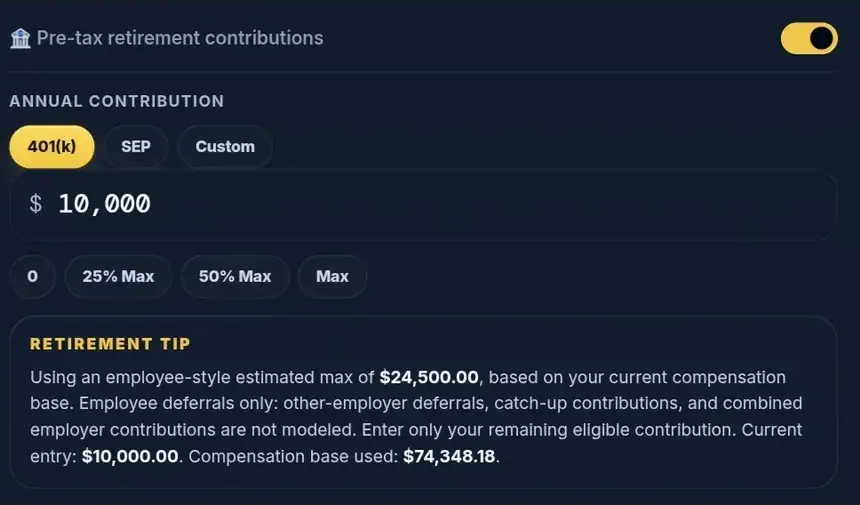
Enable Pre-tax retirement contributions, select 401(k), SEP or Custom, and enter the Annual Contribution. Check the amount the model actually applies; a preset labeled Max estimates software room and does not establish legal contribution eligibility.
The 401(k) choice models employee-style pre-tax deferrals. Its basic annual ceiling is $23,500 for 2025 or $24,500 for 2026, also limited by modeled compensation. It is not the full employee-plus-employer Solo 401(k) limit. Contributions at another employer, catch-up eligibility and plan-specific rules need separate coordination. [9, 10]
SEP uses a simplified employer-contribution formula: 20% of adjusted self-employed earnings, or 25% of modeled S-Corp owner salary, with an annual dollar cap. Custom applies a bounded planning deduction; it does not determine IRA eligibility or infer an employee/employer split. [10]
Compare taxes and spending cash separately
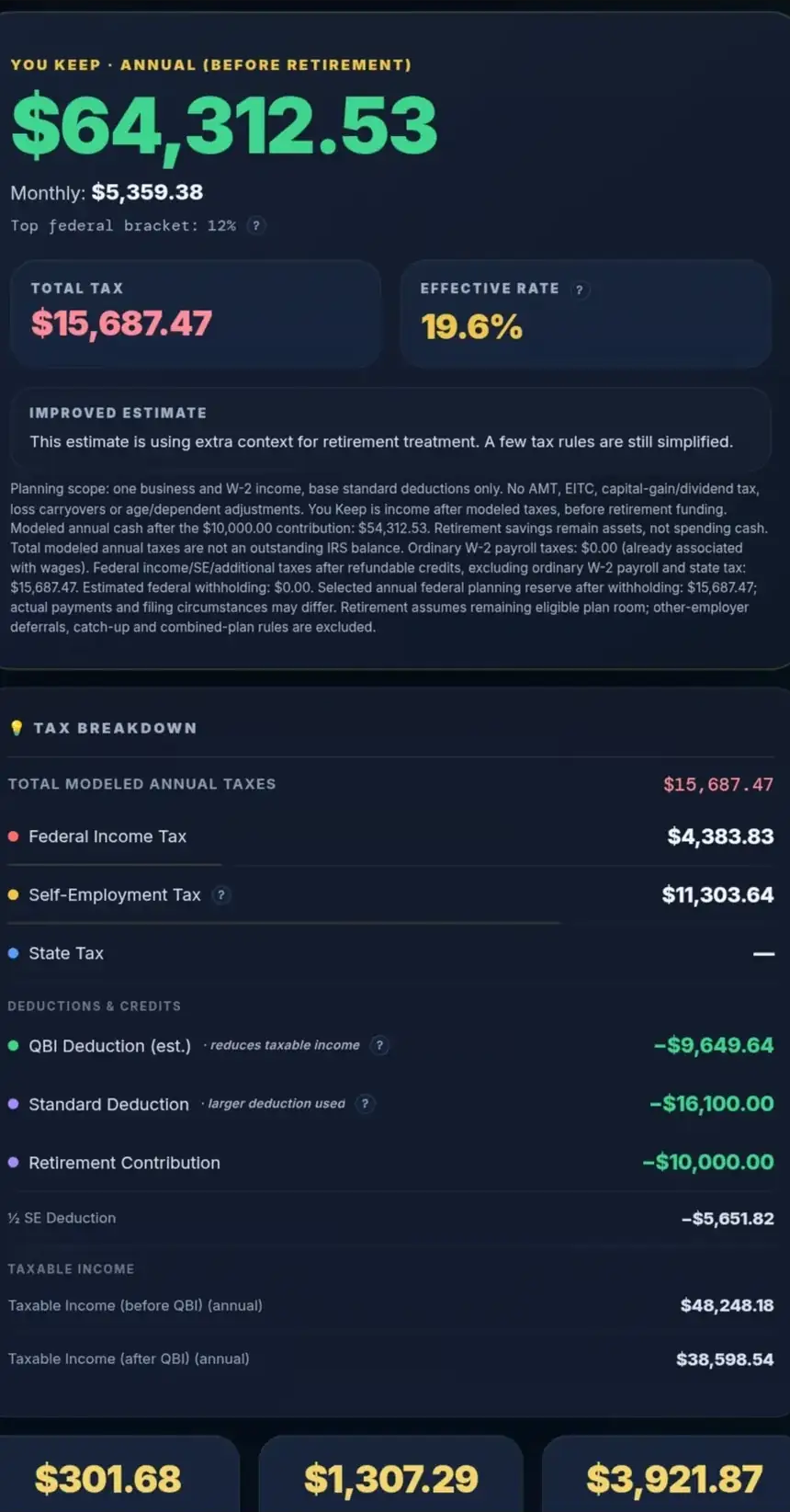
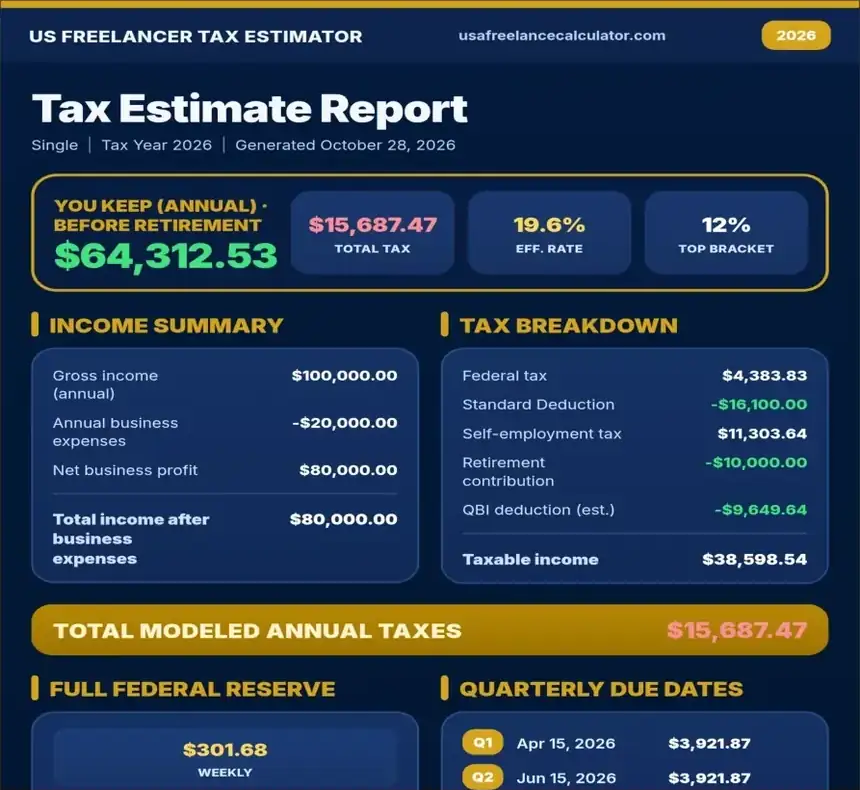
Return to E01, then choose 401(k) and enter $10,000. Keep all other assumptions unchanged.
| E06 comparison | No contribution | $10,000 contribution |
|---|---|---|
| Federal income tax | $5,343.83 | $4,383.83 |
| Self-employment tax | $11,303.64 | $11,303.64 |
| Total modeled taxes | $16,647.47 | $15,687.47 |
| You Keep before retirement funding | $63,352.53 | $64,312.53 |
| Retirement funding | $0.00 | $10,000.00 |
| Modeled cash after funding | $63,352.53 | $54,312.53 |
Taxes fall by $960.00 in this scenario. Spending cash falls by $9,040.00 because the contribution still needs funding. The $10,000 remains a retirement asset; it is unavailable for ordinary spending in this cash comparison.
With an applied contribution, the hero changes to You Keep · Annual (before retirement) or its Monthly counterpart. Use the cash-after-contribution note and subtract the applied amount once. Do not subtract it again from a figure that already represents cash after funding. Sole-proprietor retirement deductions generally do not reduce regular self-employment tax. [10]
07Compare standard and itemized deductions
Enter eligible amounts in the right fields
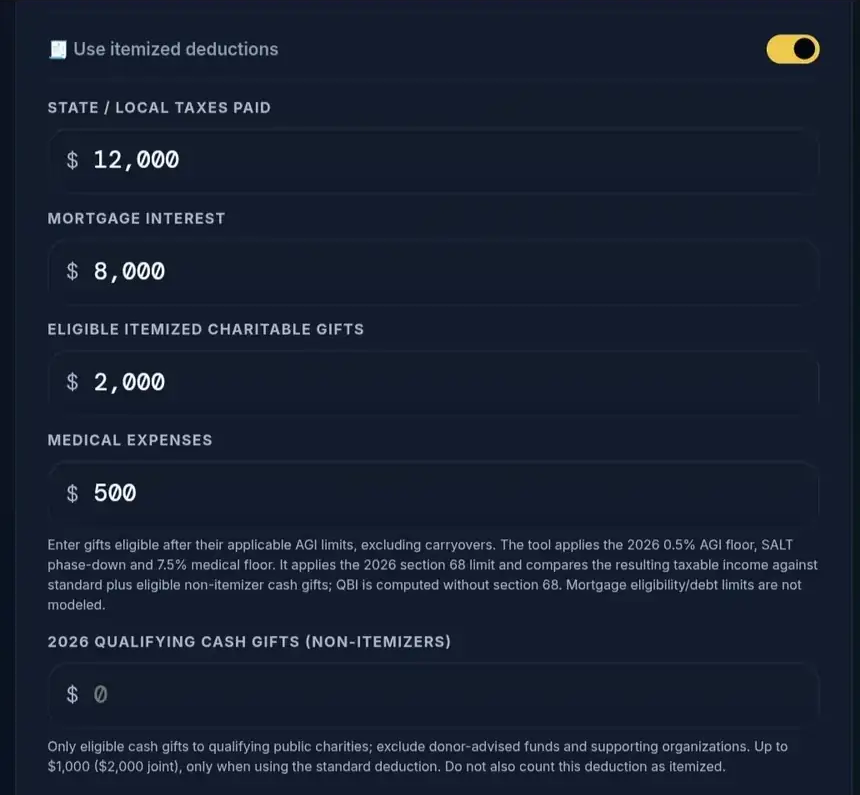
Enable Use itemized deductions to expose the modeled categories. The switch invites a comparison; it does not force itemizing to win.
State / Local Taxes Paid asks for eligible annual taxes actually paid. It is separate from the optional state-tax estimate and does not automatically copy that estimate. For the supported filing statuses, the modeled SALT cap is $40,000 in 2025 or $40,400 in 2026, with high-income phase-down rules. The IRS has specifically corrected the 2026 Form 1040-ES SALT reminder. [7, 11]
Mortgage Interest means eligible interest, not the mortgage payment or principal. The calculator assumes you have already checked debt and residence restrictions. Eligible Itemized Charitable Gifts similarly assumes the gifts meet eligibility and applicable AGI limits; it is not a donation-qualification or carryover worksheet.
Medical Expenses uses eligible unreimbursed costs and applies the 7.5%-of-modeled-AGI floor. For 2026, the model also applies the new 0.5% AGI floor to eligible itemized charitable gifts. These floors mean the amount entered and deduction applied can differ. [12]
Keep non-itemizer cash gifts separate
The 2026 Qualifying Cash Gifts (Non-itemizers) field represents a different deduction: up to $1,000, or $2,000 for joint filers, for eligible cash gifts when using the standard deduction. It does not duplicate itemized gifts. Donor-advised-fund and supporting-organization contributions do not qualify for this provision. [2, 7, 12]
USAFC compares modeled taxable-income outcomes, including interactions with QBI and the applicable 2026 high-income itemized-deduction limitation. Read which deduction was used rather than assuming the larger input total was selected. High-income section 68 calculations and final return worksheet rounding can differ from a continuous planning model. [7, 12]
08Explore the S-Corp planning mode
Enter a salary assumption and additional costs
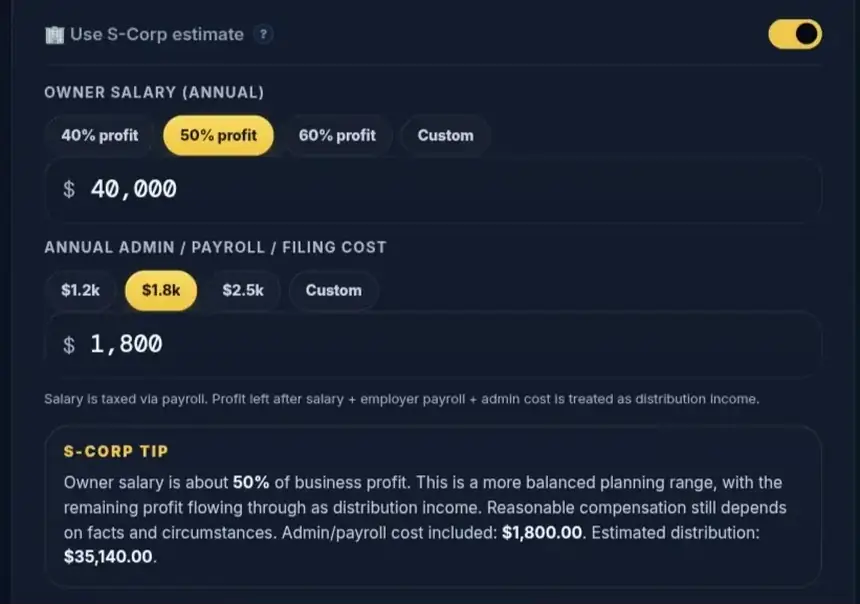
Enable Use S-Corp estimate only to explore a relevant entity scenario. Enter Owner Salary (Annual) before the modeled employee retirement deferral and an Annual admin / payroll / filing cost. For this mode, Annual Business Expenses must exclude owner salary, employer payroll and administration amounts separately modeled here. Do not duplicate owner salary under outside W-2 wages.
For E07, retain $100,000 of annual receipts and $20,000 of business expenses, choose Single and QBI on, then enter $40,000 of owner salary and $1,800 of additional administration cost. Retirement and outside wages remain off.
| E07: assumed S-Corp scenario | Amount |
|---|---|
| Profit before separate administration and payroll | $80,000.00 |
| Administration cost | $1,800.00 |
| Employer payroll tax | $3,060.00 |
| Owner salary | $40,000.00 |
| Estimated distribution | $35,140.00 |
| Federal income tax | $6,154.64 |
| Employee payroll tax | $3,060.00 |
| Total modeled personal taxes | $9,214.64 |
| You Keep | $65,925.36 |
Distribution is what remains after administration, owner salary and employer payroll. Salary plus distribution supplies the modeled personal income before personal taxes.
Reconcile the complete cash comparison
The $9,214.64 personal tax total does not include employer payroll already deducted in forming the distribution. Reconcile the cash as $80,000 minus $1,800 administration, minus $3,060 employer payroll, minus $9,214.64 personal taxes: $65,925.36.
Comparing only the personal tax headline with the sole-proprietor headline would overstate the benefit. Actual entity costs, state rules, benefits, payroll obligations and eligibility may change the comparison.
The IRS requires reasonable compensation for shareholder services before non-wage distributions. The example's $40,000 salary is an assumption, not a salary recommendation or a finding that it is reasonable. [13] Owner wages used for QBI limitations also need separate eligible-wage entry; the model does not automatically populate them.
09Add children and other dependents
Classify eligibility before counting credits
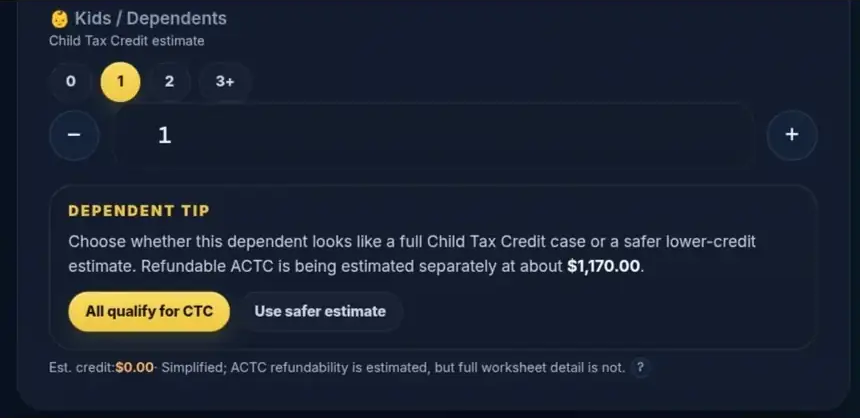
Under Kids / Dependents, enter the eligible total from 0–10 and choose the appropriate classification: All qualify for CTC, Use safer estimate or Some lower-credit dependents. These selections describe assumptions, not an eligibility interview. Verify ages, relationships, residency, support and identification requirements separately.
The modeled maximum Child Tax Credit is $2,200 per qualifying child for both supported years; the refundable ACTC ceiling is $1,700 per qualifying child. The Credit for Other Dependents is up to $500 and is nonrefundable. Income phaseouts and earned-income limits can reduce the amounts. [1, 14]
Understand a negative modeled total
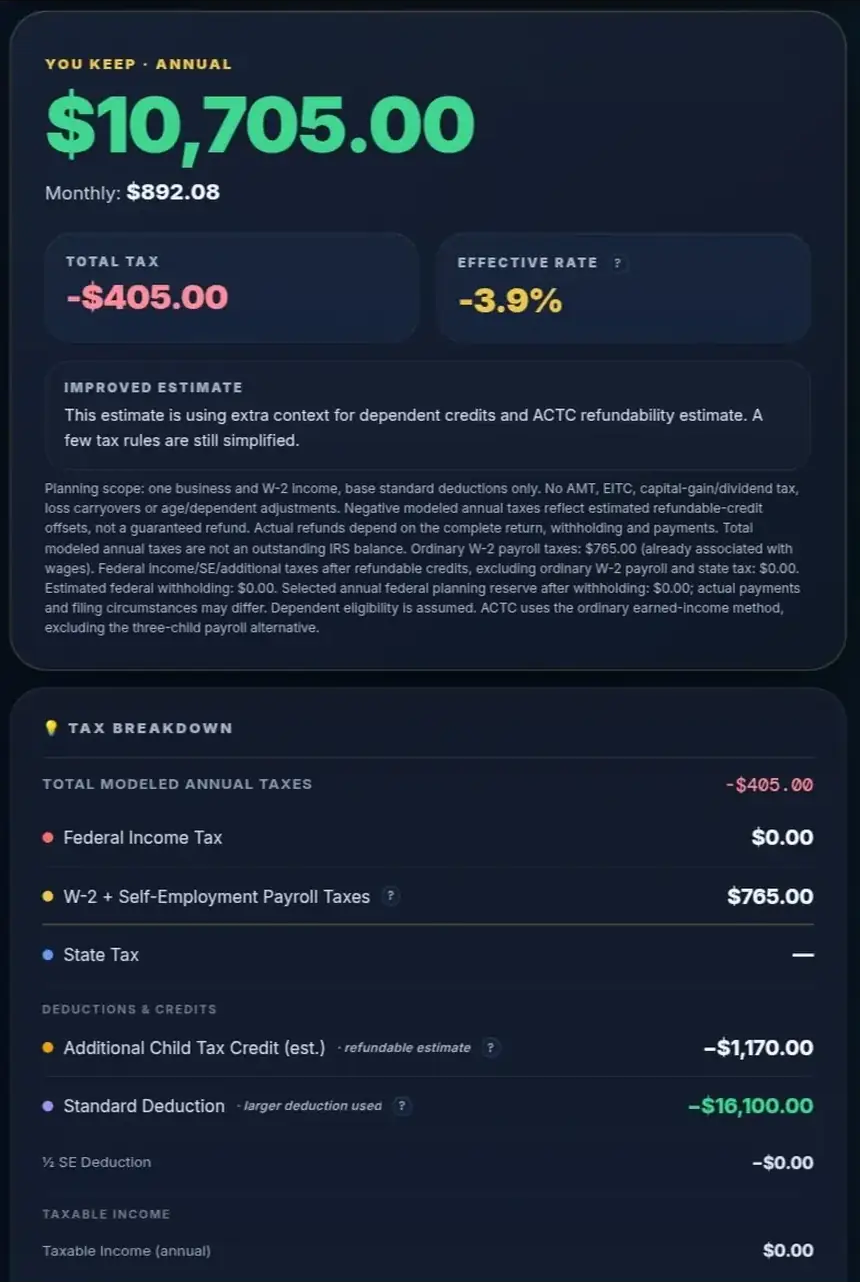
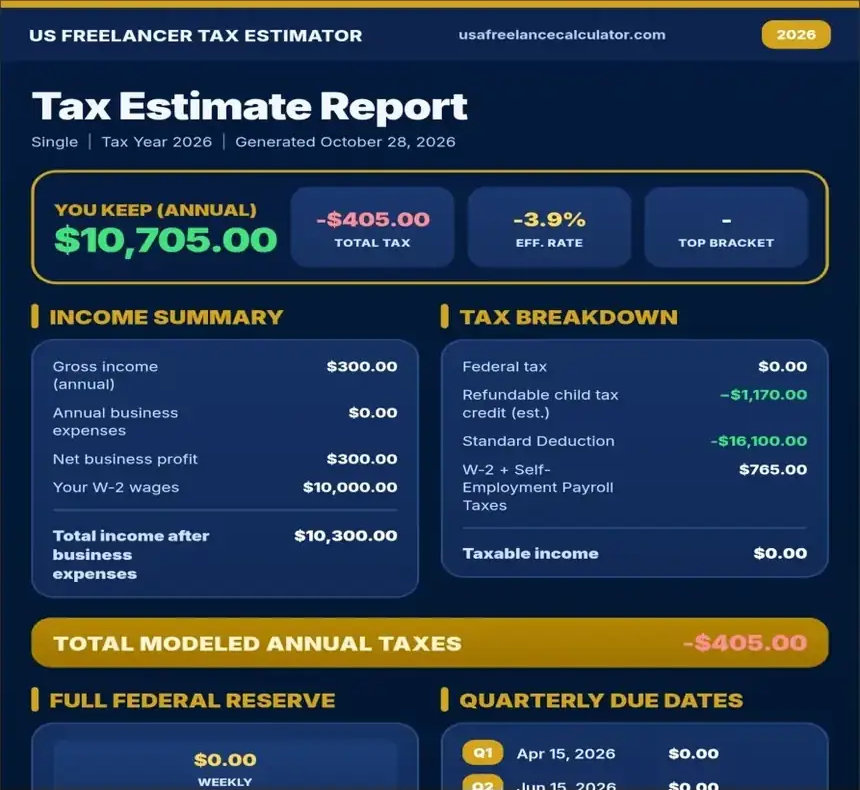
E08 uses 2026, Single, annual freelance receipts of $300 with no expenses, $10,000 of W-2 wages, one eligible child classified as qualifying for CTC, QBI on, no withholding and other options off.
| E08: low-income child-credit scenario | Amount |
|---|---|
| Wages plus business profit | $10,300.00 |
| Federal income tax after modeled credits | $0.00 |
| Ordinary W-2 employee payroll tax | $765.00 |
| Self-employment tax | $0.00 |
| Derived ordinary-method ACTC | $1,170.00 |
| Total modeled annual taxes | -$405.00 |
| You Keep | $10,705.00 |
| Federal reserve | $0.00 |
The ordinary ACTC calculation here is 15% of earned income above $2,500, within the relevant credit limits: 15% × ($10,300 − $2,500) = $1,170. [14] The $300 business profit produces ordinary-method net SE earnings below the $400 threshold, so regular SE tax is zero. [3]
The refundable credit exceeds the modeled payroll component, producing a negative total. This is not a guaranteed $405 refund. A filed return includes other tax provisions, withholding, payments and eligibility checks. USAFC excludes EITC and the three-or-more-child alternative ACTC calculation.
Retirement treatment can also affect earned income used for ACTC. In S-Corp mode, an employee pre-tax 401(k) deferral affects owner wage earnings differently from an employer SEP contribution; Custom does not infer that split. Do not assume every retirement option has the same credit effect. [14, 15]
10Understand the investment-income boundary
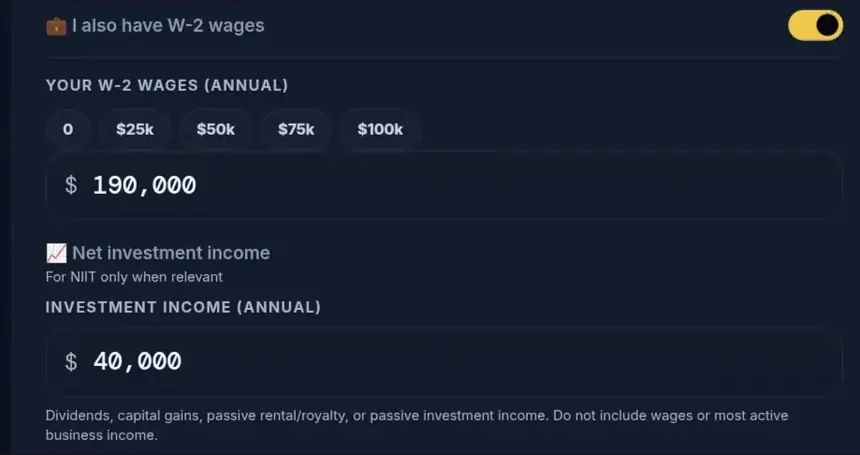
Net investment income is a NIIT-only input. It helps estimate the 3.8% Net Investment Income Tax on the lesser of eligible investment income or the applicable MAGI excess. The thresholds are $200,000 for Single and Head of Household, or $250,000 for joint filers. [16]
The field does not calculate regular tax on interest, dividends or capital gains, and investment cash is not added to You Keep. A household with significant investments therefore cannot treat the headline as its complete tax or cash result.
For example, a freelancer with a substantial salary and investment gains may have NIIT, Additional Medicare Tax and ordinary investment taxes to reconcile. Entering an investment amount addresses only the NIIT portion of that problem. Use complete return software or qualified tax help for the combined analysis.
11Plan a federal tax reserve
Separate annual taxes, savings targets and payments
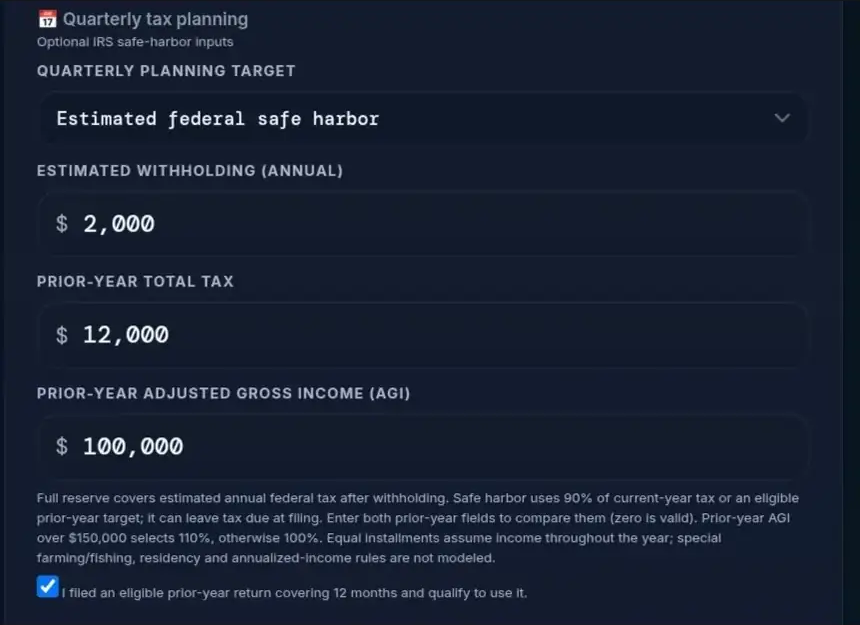
Under Quarterly Planning Target, start with Full annual federal tax reserve. Estimated Withholding (Annual) means expected full-year federal income-tax withholding. Do not include ordinary Social Security/Medicare deductions or state withholding.
The reserve subtracts that withholding from modeled federal liability and floors the result at zero. It excludes the optional state estimate and ordinary W-2 employee payroll taxes. The calculator does not collect estimated payments already made, so it cannot tell you your remaining unpaid balance.
Compare the safe-harbor option
Estimated federal safe harbor compares the current-year benchmark with an eligible prior-year benchmark. Generally, the benchmarks are 90% of current-year tax or 100% of eligible prior-year tax; the prior-year percentage rises to 110% when prior-year AGI exceeds $150,000 for the supported statuses. These are penalty-planning rules with eligibility and payment-timing requirements. [2, 12]
Enter Prior-Year Total Tax, Prior-Year Adjusted Gross Income (AGI) and, only when true, check I filed an eligible prior-year return covering 12 months and qualify to use it. Prior-year tax is not the previous refund or balance due; use the IRS worksheet definition. A blank field and an explicit zero are different assumptions. Without complete eligible prior-year inputs, the safe-harbor mode uses only its modeled 90% current-year test. It also applies a $1,000-after-withholding and withholding-coverage screen; a zero target is not a determination that you owe no tax. [2, 12]
E05 keeps E01's $16,647.47 annual federal model, adds $2,000 of federal withholding, and supplies prior-year total tax of $12,000 and AGI of $100,000 with the eligibility checkbox checked.
| E05 reserve comparison | Annual amount |
|---|---|
| Modeled full federal liability | $16,647.47 |
| Expected federal withholding | $2,000.00 |
| Full federal reserve after withholding | $14,647.47 |
| Eligible prior-year benchmark | $12,000.00 |
| Selected safe-harbor reserve after withholding | $10,000.00 |
A $10,000 reserve plus $2,000 withholding can still leave $4,647.47 against the full modeled liability. That difference is illustrative arithmetic, not a filed balance due. Meeting an annual safe-harbor amount does not by itself prove payments were timely.
Set Aside / Wk, Set Aside / Mo and Pay / Quarter divide the selected annual target into savings intervals. For instance, $10,000 divided by four is $2,500. That division does not establish what you should pay now, particularly after earlier payments or uneven earnings.
Check dates for the selected tax year
The standard 2026 installment dates are April 15, June 15 and September 15, 2026, followed by January 15, 2027. The final installment belongs to tax year 2026. [2]
For year-end planning, reconcile what you have already paid before treating any quarterly figure as the remaining amount. The 2026 Form 1040-ES permits omitting the January 15 installment if you file the 2026 return and pay the entire balance by February 1, 2027. That exception does not erase earlier installment underpayments. [2]
Disaster relief and special rules can change obligations. Uneven income may warrant the annualized-income method, which this calculator does not perform. Use the quarterly estimated-tax payment guide and check applicable IRS disaster relief. This guide makes no claim about the opening date of the 2027 filing season.
12Save, copy or export a scenario
Record a checked snapshot
Before saving, review the selected year, income period, expenses and every active advanced option. Check the settled annual figures and relevant cash or credit notes.
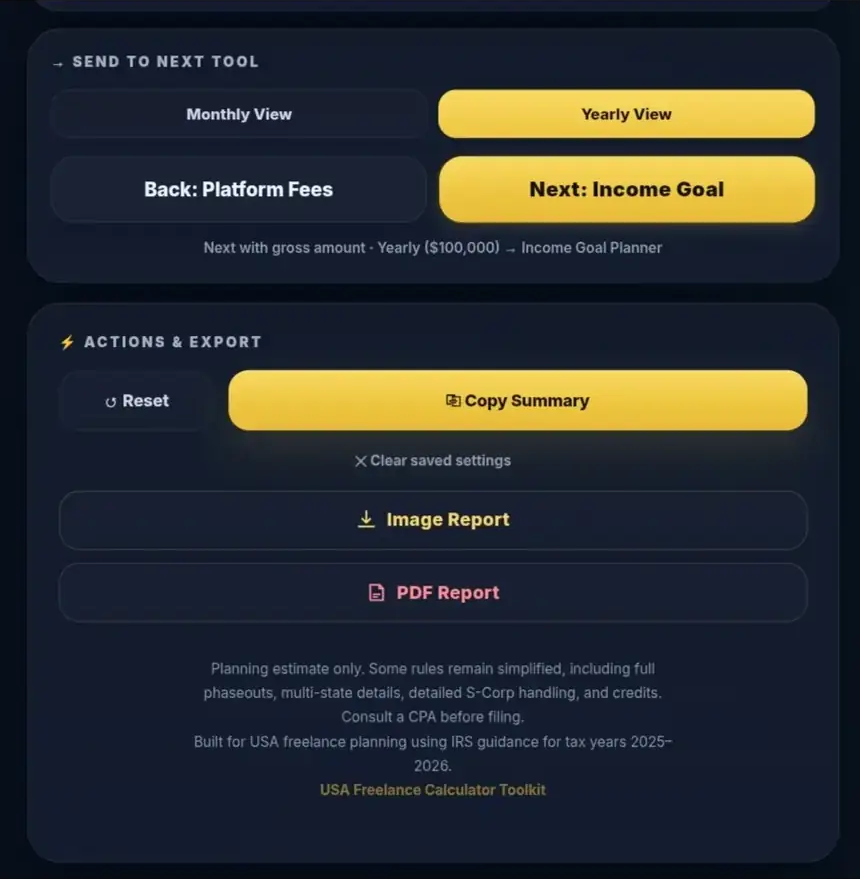
Use Copy Summary for a text record. Image Report is the PNG export control; PDF Report requests a PDF. After downloading either format, open the actual file and compare its year, inputs, totals, signs and scope notes with the current scenario. For retirement or negative-tax cases, retain the qualification beside the number.
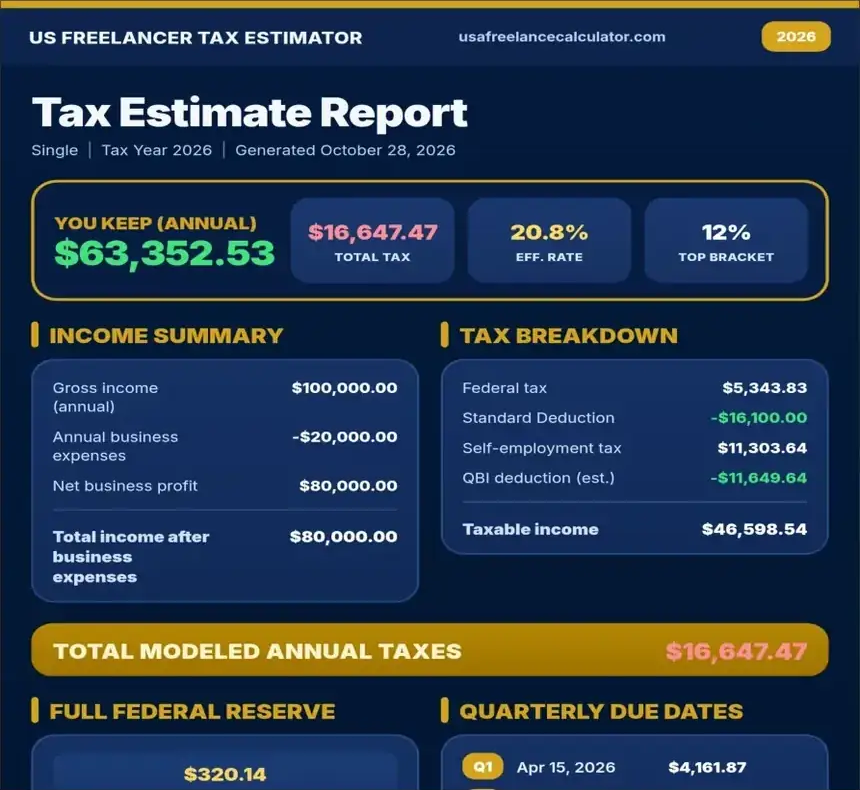
If an export fails, keep a checked text summary and retry after correcting inputs. An exported snapshot represents its saved assumptions; it does not update when your income changes.
Check saved settings before returning
The calculator can retain settings in the browser. Treat that as a convenience rather than a financial archive or cloud account. Keep your own scenario record.
Reset clears the current scenario and restores defaults, including 2026, Annual and QBI on. Clear saved settings removes persisted settings and also resets the form without saving the reset state. Record useful inputs before using either, then verify the displayed year and options afterward.
Review your inputs and save a scenario once its assumptions match your plan.
13Continue from fees to goals
Preserve the amount's meaning
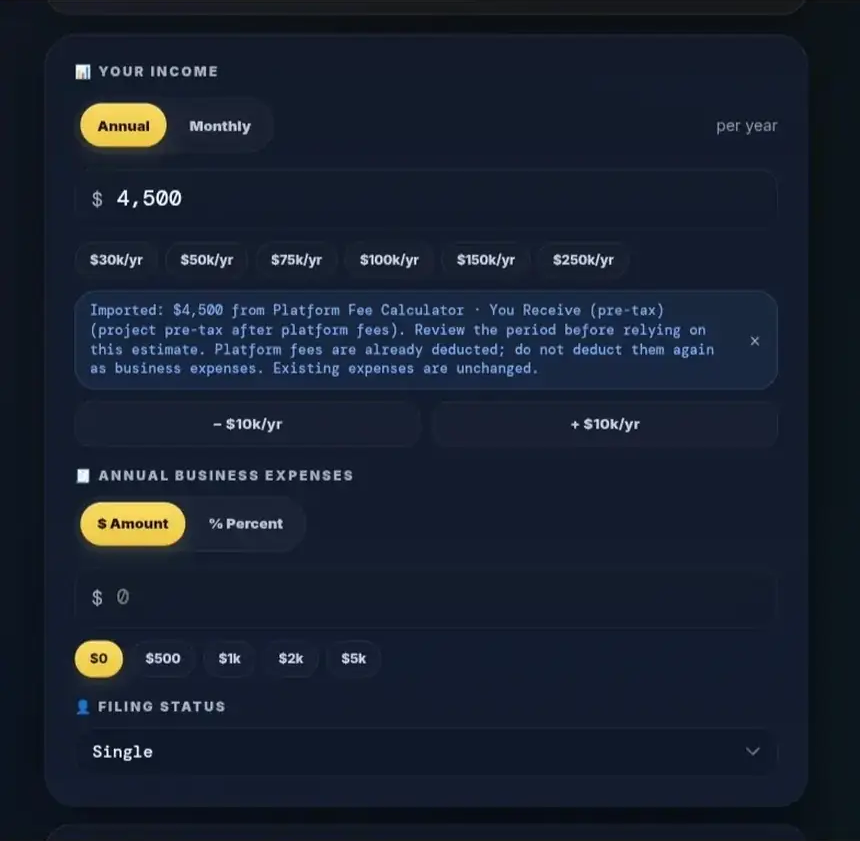
Start in the Platform Fee Calculator when platform charges affect your receipts. For a synthetic example, a $5,000 client amount with a custom 10% fee leaves $4,500 before taxes. This is arithmetic using an assumed fee, not a current marketplace fee quote.
If transferring You Receive (pre-tax) to the Tax Estimator, inspect the import message, period and income field before continuing. The $500 fee has already been removed from that amount; deducting it again as an expense would understate profit.
Keep project, monthly and yearly amounts distinct
A $4,500 monthly payout implies $54,000 of annual receipts only if that monthly forecast is appropriate. A $4,500 yearly amount means $4,500 for the year. A $4,500 one-time project must be combined with the rest of your annual forecast; it is not automatically recurring income.
Under Send to Next Tool, choose Monthly View or Yearly View, read the outgoing hint, then select Next: Income Goal. In the Income Goal Planner, check the received period, basis and amount before using the estimate. Important observed limitation: In the tested standalone flow, the Platform Fee Calculator defaults its outbound period to Project. Manually changing the Tax Estimator's income mode can clear the after-fee import banner and its source-basis metadata. The Income Goal Planner may then show Imported Gross Context for a $54,000/year figure even if the earlier amount originally represented money after platform fees. That is not proof of a successful after-fee, three-tool handoff. If the banner disappears or the destination says Gross, treat the basis as unverified. Record the client gross, fees, period and net amount separately; do not use this transfer as a confirmed automatic conversion or deduct platform fees a second time. This is a documented workflow limitation, not a finding that taxes were automatically charged twice.
Capture note: The supplied S16 destination screenshot displays Imported Gross Context. It is retained as debugging evidence, not pictured as a successful after-fee transfer. For reliable planning, check the outgoing hint and enter a confirmed annualized amount with the correct basis.
14Fix common input and interpretation mistakes
If the result looks implausible, check the period and expense basis first. Monthly dollar expenses entered as annual costs understate expenses; annual income left in the field after selecting Monthly overstates receipts.
Next, inspect advanced settings. An old child count, state rate, retirement contribution or outside wage amount can affect a new estimate. Confirm that employment income and S-Corp owner salary have not been entered twice, and that platform fees have not been deducted after an after-fee import.
Malformed active fields trigger Correct these inputs before calculating, exporting or continuing:. Follow the indicated field, replace the invalid entry with a valid nonnegative amount such as 80000 or 80,000.25, leave the field and check the settled result. Enter numbers without a dollar symbol. Do not copy an earlier result while a current input is invalid.
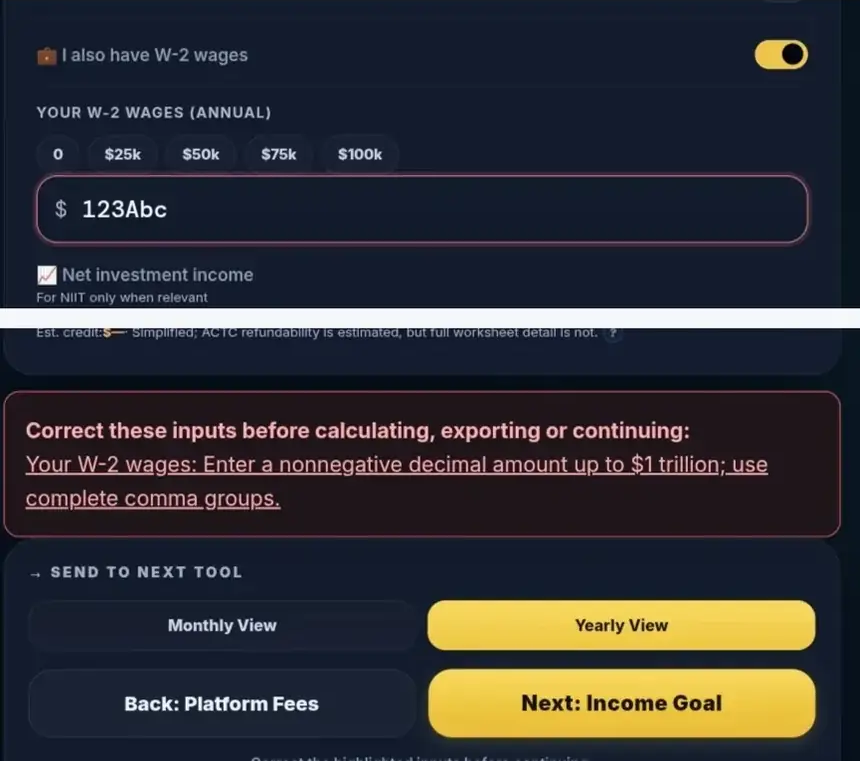
Finally, check what the figure represents. Withholding changes a federal reserve; retirement funding changes spending cash; neither makes Total modeled annual taxes a bank balance. When expenses exceed receipts, or business receipts are zero and wages are your only income, use a tool suited to that situation.
15Frequently asked questions
Which year should I select when filing in 2027?
Select 2026 for 2026 earnings. Filing year and tax year are different. The current tool has no 2027 income-year model; see year selection.
Are business expenses monthly when income is Monthly?
Dollar expenses remain annual. Monthly applies to the income field, which is multiplied by 12. Recheck both fields after changing modes; see the monthly example.
Does every freelancer get the $400 QBI minimum?
No. It is conditional on qualifying active QBI and material participation, among other applicable rules. It is a deduction rather than a credit; see QBI settings.
Why is the payroll row larger after I add W-2 wages?
The combined row includes ordinary employee payroll taxes on wages as well as applicable self-employment/payroll components. It does not represent freelance SE tax alone; see mixed income.
Does a negative annual tax mean I will receive that refund?
No. A modeled refundable credit can exceed included taxes, but the full return and prepayments determine any actual refund. See the dependent-credit example.
Why does You Keep rise after a retirement contribution?
Modeled tax can fall while the hero remains before retirement funding. Subtract the applied contribution to identify modeled spending cash; see the retirement comparison.
Is Pay / Quarter the payment I must make today?
It is a division of the selected annual planning target. Earlier payments, withholding timing, uneven income and other rules still matter; see federal reserves.
Does the investment field calculate capital-gains tax?
It models NIIT only. Regular investment taxes and investment cash are excluded; see the investment boundary.
Does choosing my state calculate a state return?
No. It applies the selected simplified model or planning rate. State-specific deductions, credits and local taxes need separate work; see state estimates.
Can I return to my estimate later?
Browser-saved settings may restore your inputs, but keep a checked summary or report as your own record. Recheck restored assumptions before use; see saving scenarios.
16Methodology, limitations and your next step
How the examples were checked
This guide describes the deployed calculator and matching source reviewed on October 28, 2026. Its implementation reference is repository baseline c071f057. Selected live text observations were reconciled with independently derived arithmetic. That does not mean every advanced variant, export or toolkit destination has been browser-tested.
The model uses continuous bracket calculations and retained intermediate precision. Displayed rows round to cents; summing rounded rows or comparing with a filed-return Tax Table can produce differences. Tax-law sources establish rules, while source code establishes modeled behavior. Neither source inspection nor citations constitute IRS approval.
Know when to use a fuller calculation
Important exclusions include AMT, EITC, ordinary investment taxation, complete multi-business/loss coordination, full retirement-plan coordination and comprehensive state/local taxation. The tool also simplifies dependent eligibility, charitable and mortgage eligibility, wage-base reporting, entity planning and the prior-year estimated-tax worksheets. Age-related adjustments, self-employed health-insurance deductions and other tax provisions may materially affect an actual return.
Use complete tax-return software or qualified professional advice for unsupported situations, entity decisions, uncertain eligibility or material discrepancies. No CPA review, certification or guaranteed refund is claimed here.
Sources and tax-year notes
The principal 2026 planning authorities are final 2026 Form 1040-ES, Publication 505 and Revenue Procedure 2025-32. The Schedule SE, Schedule 8812 and Forms 8995/8995-A instruction pages checked for this draft remain labeled 2025; they support mechanisms alongside enacted law and 2026 amount guidance. A draft instruction is not treated as final authority. Source status must be refreshed before publication.
- IRS Revenue Procedure 2025-32, 2025-45 Internal Revenue Bulletin: 2026 indexed amounts and amended 2025 standard deductions.
- IRS Form 1040-ES (2026): estimated-tax tests, SE worksheet and payment dates; read its SALT reminder with source 11.
- IRS Schedule SE instructions (2025): ordinary SE method and threshold; 2026 wage base from source 2.
- IRS Topic 560: Additional Medicare Tax.
- IRS Form 8995 instructions (2025): ordinary QBI mechanics.
- IRS Form 8995-A instructions (2025): SSTB, wage and property limitations; read 2026 changes with sources 1 and 7.
- Public Law 119-21, especially sections 70105, 70111, 70120 and 70424–70425; IRS QBI update.
- IRS General Instructions for Forms W-2 and W-3 (2026).
- IRS retirement-plan COLA table: year-labeled dollar limits.
- IRS Publication 560 (2025): self-employed retirement contribution mechanics; 2026 limits from source 9.
- IRS correction to the 2026 Form 1040-ES SALT reminder.
- IRS Publication 505 (2026): withholding, estimated-tax rules and deduction worksheets.
- IRS S corporation compensation guidance.
- IRS Schedule 8812 instructions (2025): eligibility and ordinary ACTC mechanism; 2026 caps from source 1.
- IRS retirement-contribution withholding FAQ: employee deferrals and wage treatment.
- IRS Net Investment Income Tax guidance.
Put the estimate to work
Update your estimate in the Freelance Tax Estimator, record the assumptions, and separate your tax reserve, retirement funding and spending cash. Revisit the forecast when income, expenses or household circumstances change. Then use the Income Goal Planner or Budget Planner to turn the checked figures into your next financial decision.
Turn an estimate into a planning habit.
Start with one clean scenario, confirm your assumptions, export a checked snapshot and revisit it when income or costs change. The calculator helps you plan; it does not file a tax return.
Use the free tax estimator →Educational planning only. All scenario values in this guide are synthetic. This tutorial does not imply IRS endorsement, a guaranteed tax outcome, or independent certification of every model edge case.